How to Bleep Words in Video Without CapCut, iMovie, or Premiere (Free)
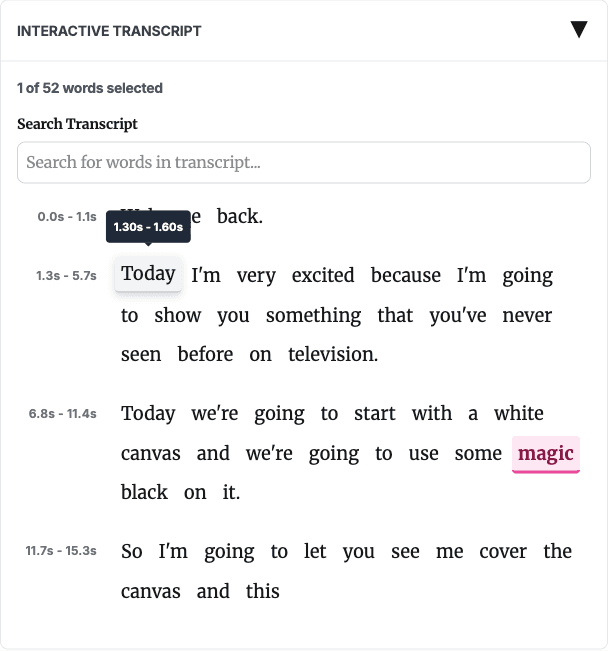
Fast answer: if you need the CapCut/iMovie/Premiere method, manually locate the word, split or mute the audio, place a bleep sound, and repeat for each word. If you want the faster Bleep That Sh*t! workflow, start in Studio, generate an AI transcript, review likely matches, select words to censor, and export a clean MP4.
Quick Comparison
| Task | CapCut, iMovie, or Premiere | Bleep That Sh*t! |
|---|---|---|
| Find target words | Listen and scrub the timeline | Review an AI transcript with timestamps |
| Select many words | Repeat timeline edits | Apply word lists, search, or click transcript words |
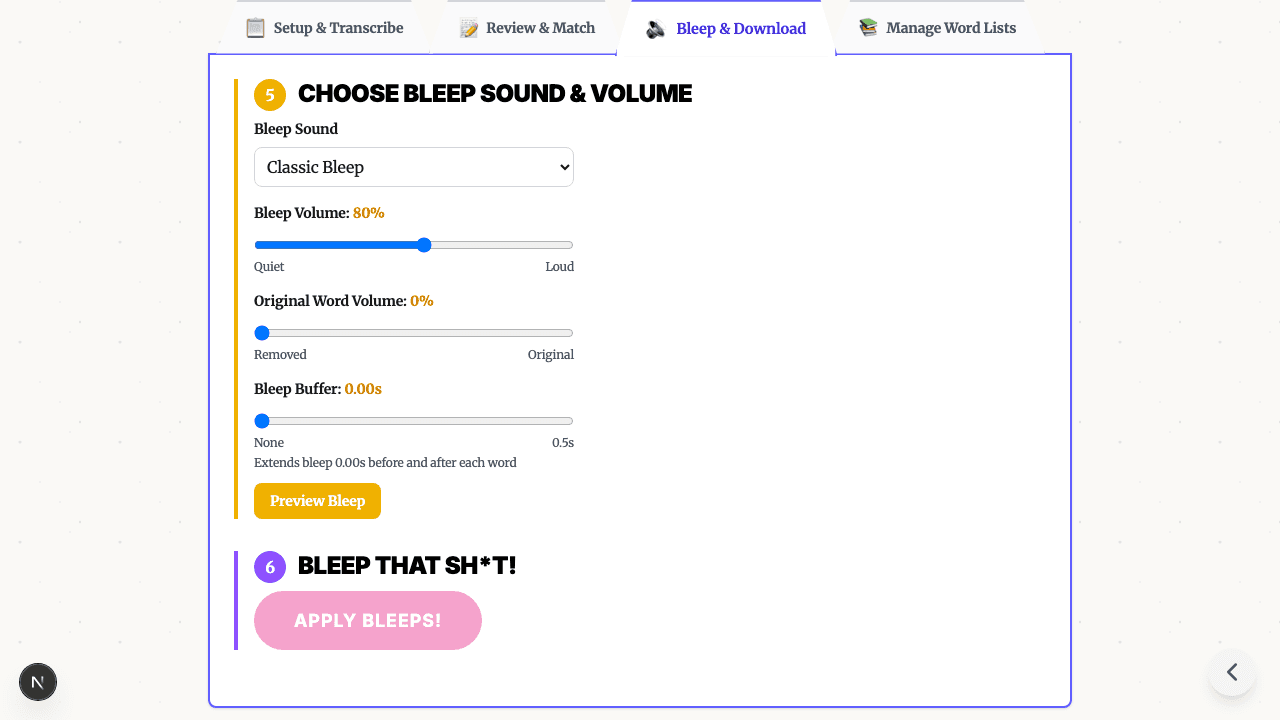
| Add censor sound | Place or configure audio edits manually | Choose built-in bleep, silence, brown noise, or other sounds |
| Review timing | Play back each edit | Preview selected timestamps before export |
| Best fit | Full creative editing | Fast profanity cleanup before publishing |
How to Bleep Out Words in CapCut
CapCut interfaces change over time, but the manual workflow people search for usually looks like this:
- Import your video into a CapCut project.
- Play the clip and identify the exact word you want to censor.
- Split, mute, or lower the original audio around that word.
- Add a bleep sound effect or silence over the same timestamp.
- Preview the transition and adjust timing.
- Repeat for every word.
- Export the final video.
That method works, but the bottleneck is finding each word and repeating the same edit.
How to Bleep Out Swear Words on CapCut
Use the same manual timeline process for swear words: listen for the word, isolate the audio around it, cover it with a bleep or silence, then preview the timing. If the clip has many target words, transcript review is usually easier because you can scan the words before editing.
How to Bleep Out a Word on CapCut iPhone or Android
On mobile, the steps are still timeline-based, just on a smaller screen. If you are starting with a phone upload, Studio cloud transcription is the better Bleep That Sh*t! path because it gives you timestamped words to review without asking a mobile browser to run the AI model locally.
How to Bleep Words Without CapCut
Use Bleep Studio:
- Drop in your video.
- Generate a timed transcript.
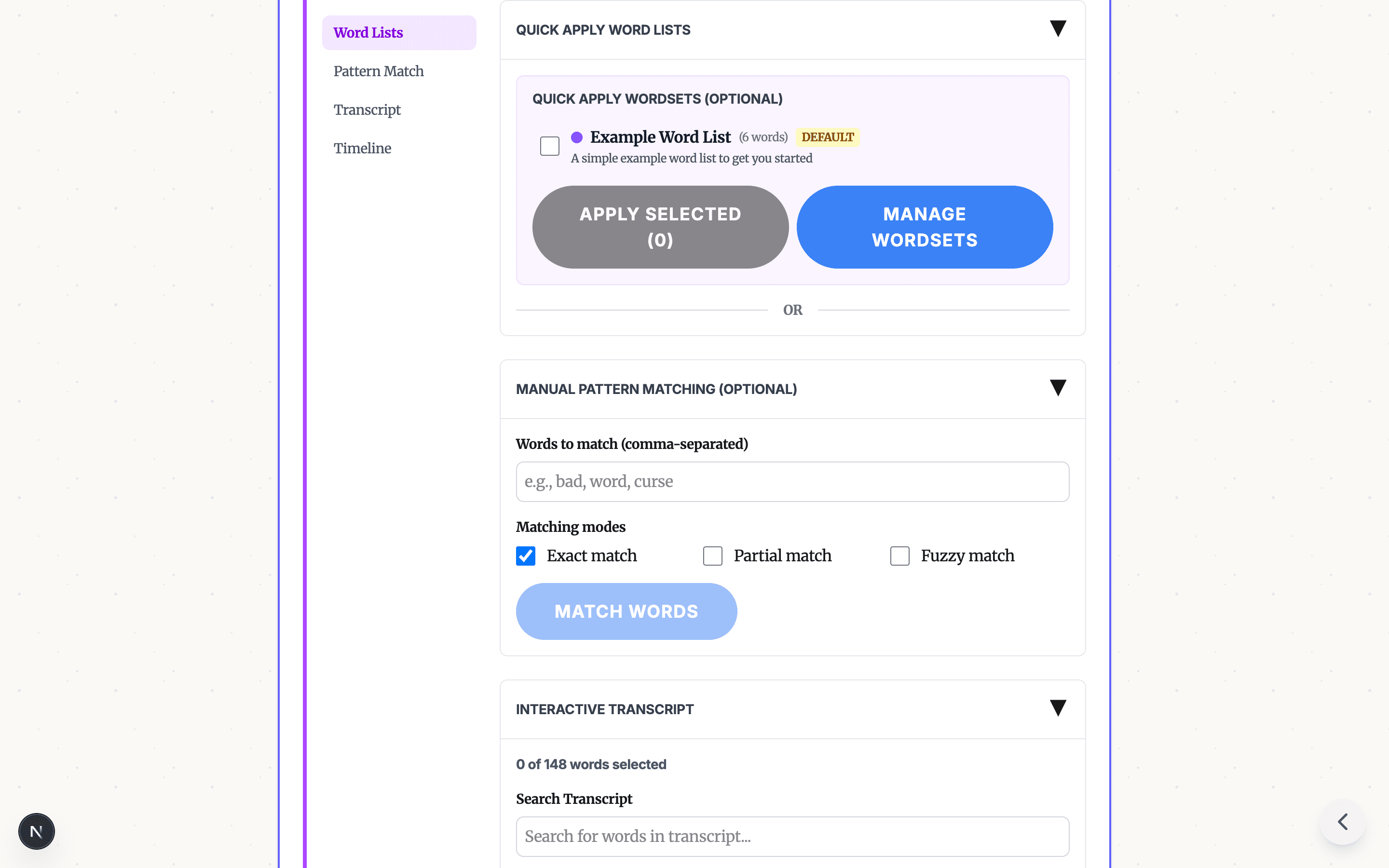
- Apply a built-in profanity list, search for words, or click transcript words manually.
- Choose bleep, silence, or another built-in censor sound.
- Preview and download the clean MP4.

This does not replace a full video editor when you need motion graphics, captions, cuts, color, or creative timeline work. It is built for the narrower job: review spoken words, censor selected audio moments, and export a clean version.
How the Transcript Review Workflow Works
Upload and Transcribe
Upload your MP4, MOV, AVI, WebM, MP3, or WAV. Browser mode is best for short desktop files; Studio handles phone uploads and longer files.

Select Words
Use built-in word lists for common profanity, search for exact or partial matches, or click individual transcript words. Review the selected words before applying bleeps.

Preview and Download
Pick a sound, adjust timing if needed, preview the result, and export a clean MP4.

Privacy and File Handling
Browser mode processes short desktop clips on your device. For phone uploads or longer files, use Studio cloud processing, which clearly indicates when upload-based processing is used. See why browser-based processing matters for privacy-sensitive workflows.
Frequently Asked Questions
How do I bleep out words in CapCut? In CapCut, the manual path is to locate the word on the timeline, split or mute the audio around that moment, place a bleep sound effect, check the timing, and repeat for each word.
Is there a faster way than CapCut for bleeping words? Yes. Bleep That Sh*t! creates an AI transcript with timestamps so you can review likely matches, apply word lists, click words to censor, and export a clean MP4.
How do I bleep out a word on CapCut iPhone or Android? The mobile editor path is still timeline-based. For phone uploads, use Studio cloud transcription so you can review timestamped words with taps instead of scrubbing a mobile timeline.
Does Bleep That Sh*t! add a watermark? No. The exported file from Bleep That Sh*t! does not add a Bleep watermark.
Do I need to install anything? No. Browser mode runs in a capable desktop browser. For phone uploads or longer files, use Studio cloud processing.
Try It Now
Start in Bleep Studio, try the upload-focused censor video online workflow, or read the complete how-to guide for bleeping words in video.
READY TO CLEAN YOUR VIDEO IN STUDIO?
Start in Studio for cloud transcription, saved projects, reusable word lists, and cleaner repeat exports.
START IN STUDIO FREERelated Articles
Profanity Filter List for Audio, Video, and Text
A practical profanity filter list strategy for creators: what to detect, what to review manually, and how AI tools help bleep audio or video without over-censoring.
Bleep Sound Effect: How to Add a Censor Beep to Audio or Video
Choose a bleep sound effect, silence, or noise for censoring profanity in audio and video, then place it with transcript timestamps before export.

How to Bleep Out Words in Any Video (Free, No Download)
Bleep out swear words in any video for free. No download or signup required. Upload, select words to censor, and export in seconds.