Profanity Filter List for Audio, Video, and Text
Creators use profanity filter lists for different jobs: moderating text, preparing classroom-safe clips, protecting YouTube uploads, cleaning podcast episodes, or making sponsor-friendly edits. A useful list helps you find risky language quickly, but it should not decide every censor point by itself.
Profanity filtering means very different things depending on whether you're working with text, audio, or video. This guide breaks down how each approach works, what to include in a first-pass list, and how to handle the audio/video case that traditional filters can't touch. If you want the product workflow instead of list-design guidance, use the AI profanity filter. If your goal is a reviewed clean-file outcome, continue to the swear word remover.
A Useful Profanity Filter List Has Three Layers
A practical profanity filter list is not just a giant blocklist. For audio and video editing, it works better as three layers:
| Layer | What it catches | How to use it |
|---|---|---|
| High-confidence profanity | Common swear words and obvious variants | Auto-select these first, then review before export |
| Platform-sensitive words | Words that may affect school, brand, YouTube, or workplace distribution | Review based on the audience and where the video will be posted |
| Context-only terms | Slurs, quotes, reclaimed language, medical terms, names, and words with multiple meanings | Never censor blindly; inspect the transcript and surrounding sentence |
For creators, the goal is not to erase every risky syllable. The goal is to make a clean version that keeps the meaning, pacing, and intent of the original clip.
Audio and Video Need Review, Not Just a Text Blocklist
Text filters can match a word and stop there. Audio and video need timestamps. A good workflow is:
- Transcribe the file.
- Search for words from your profanity list.
- Review each match in context.
- Choose bleep, silence, or another censor sound.
- Preview the result before downloading.
Bleep That Sh*t! follows that workflow in Studio. Start with Bleep Studio, or use /censor-audio and /censor-video when you already know the file type.
Text-Based Profanity Filters
How They Work
Text filters are the oldest and most common approach. At their core, they compare input text against a list of flagged words and take action — replacing with asterisks, blocking the message, or flagging for review.
The basic pipeline:
- Normalize the input — lowercase, strip punctuation, handle Unicode tricks (like replacing "a" with "á")
- Tokenize — split into words
- Match against a word list — exact match, substring match, or regex patterns
- Take action — replace, block, flag, or score
How to Source a Base List
Start with terms your own audience, publishing policy, or moderation history actually requires. Record the language, locale, severity, and reason for each entry. If you evaluate a public or community-maintained list, review its license, maintenance history, language coverage, and categories before importing anything. Never treat an unknown list as an authoritative default: sample it against real content, remove irrelevant terms, and add only the vocabulary your use case needs.
The Limitations of Word Lists
Word lists are a starting point, not a solution. They struggle with:
Context blindness. "Damn" in "damn, this is good" is mild. "Damn" in a direct insult is different. Word lists can't tell the difference.
The Scunthorpe problem. Substring matching flags "Scunthorpe" (English town), "assassin," "pianist," and "cocktail." Overly aggressive filters create false positives that frustrate users.
Evasion. Users quickly learn to bypass filters with creative spelling: "fck," "f*ck," "fμck," Unicode substitutions, zero-width characters, or Leetspeak ("sh1t"). Each evasion technique requires explicit handling.
New vocabulary. Slang evolves faster than lists can update. A word list from 2024 may miss terms that became offensive in 2025.
Multilingual gaps. A word list for one language is useless for another. Maintaining lists across 10+ languages is a major ongoing effort.
Modern Text Filter Approaches
To address word list limitations, modern text filters layer additional techniques:
- Phonetic matching (Soundex, Metaphone) — catches "phuck" and similar sound-alikes
- Levenshtein distance — flags words within N edits of a listed term
- ML classifiers — trained models that score text for toxicity beyond exact word matches (Google's Perspective API, OpenAI's moderation endpoint)
- LLM-based moderation — using language models to understand context and intent, not just vocabulary
The trend is clear: text filtering is moving from word lists toward AI-powered contextual understanding.
Audio Profanity Filtering
The Challenge
Audio profanity filtering is fundamentally harder than text filtering. You can't do a string comparison on a sound wave. The audio must first be converted to text (speech-to-text / transcription), then the text can be analyzed, and finally the audio must be modified to remove or replace the identified words.
This creates a three-stage pipeline:
- Transcription — Convert speech to text with word-level timestamps
- Detection — Identify which words to censor (word lists, patterns, or manual selection)
- Replacement — Replace the audio at those timestamps with a bleep sound, silence, or alternative audio
Why This Was Hard Until Recently
Before 2022, accurate word-level transcription required:
- Expensive commercial APIs (Google Speech, AWS Transcribe) at per-minute pricing
- Uploading audio to cloud servers (privacy concern)
- Post-processing to align word timestamps with the audio
The release of OpenAI's Whisper in 2022 changed the equation. Whisper provides:
- Word-level timestamps out of the box
- Support for 90+ languages
- Open-source models that can run locally in browser-mode workflows
- Accuracy comparable to commercial APIs
This made it possible to build audio profanity filters that run entirely in the browser without sending files to a server.
How Audio Filtering Works in Practice
Using Bleep That Sh*t! as an example:
- Choose the processing path — Browser mode keeps supported short desktop clips on-device; Studio uploads files for cloud processing and supports phone, longer-file, and saved-project workflows
- AI creates a word-level transcript — Whisper generates transcript words with precise start/end timestamps
- Select words to censor using any combination of:
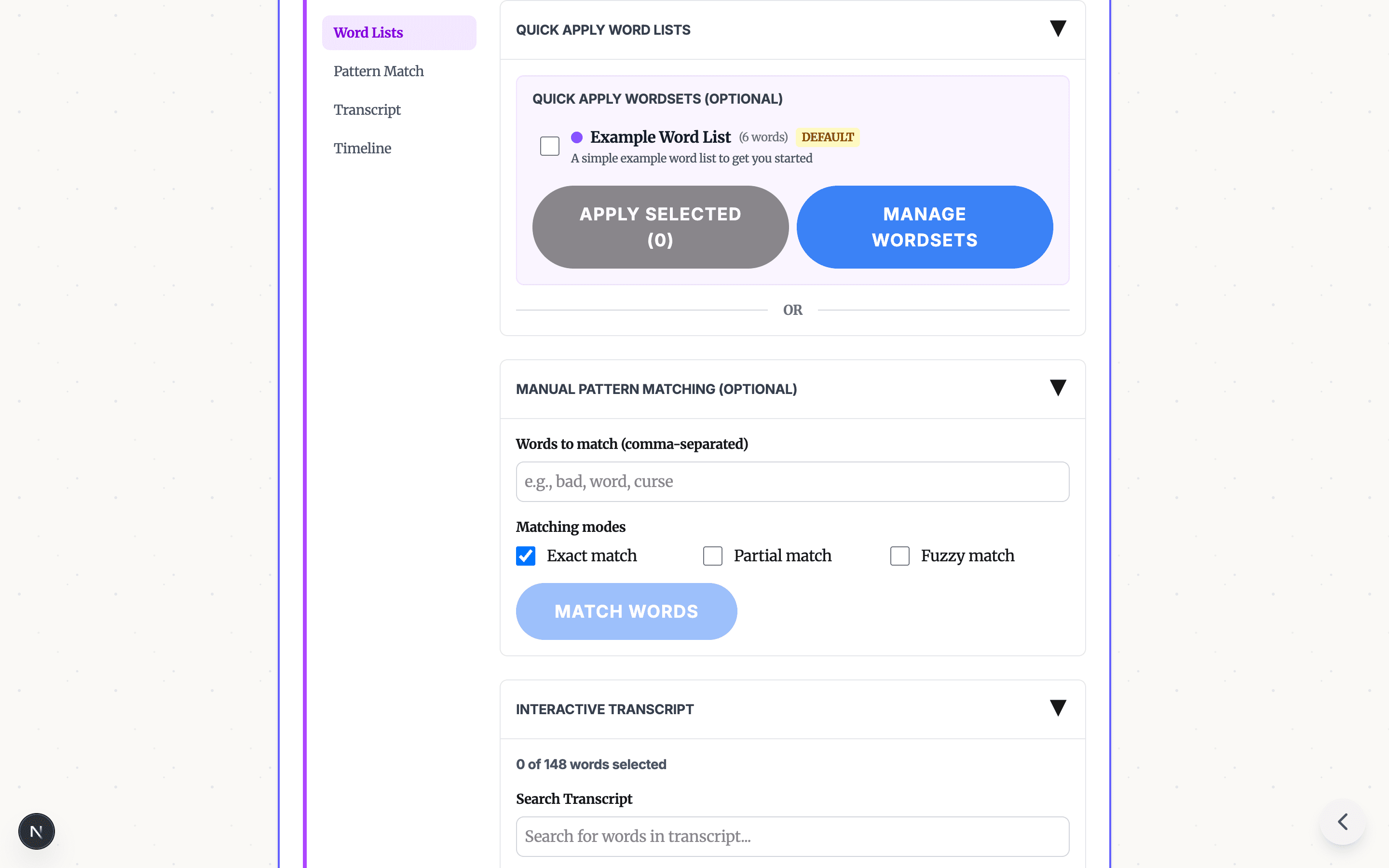
- Pre-built profanity word lists (one-click filtering)
- Pattern matching with exact, partial, or fuzzy modes
- Manual click-to-select on the transcript
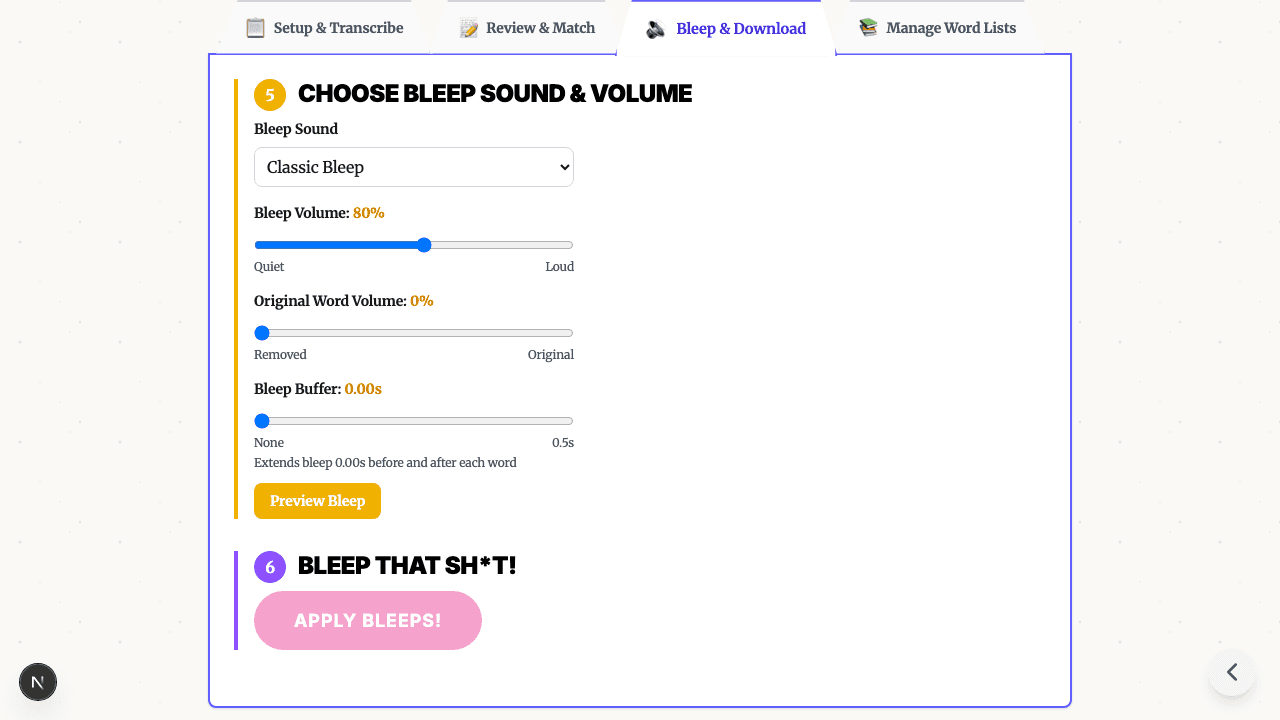
- Choose a replacement sound — classic bleep, silence, brown noise, or fun sounds. Read about the history of the bleep sound and why the 1000 Hz tone became the standard.
- Download the censored file — the tool replaces audio at the selected timestamps and exports the result
The key advantage over text-only filters: you get the original audio back with surgical modifications, not a transcript with asterisks.
Video Profanity Filtering
Audio Track Extraction and Remixing
Video profanity filtering is essentially audio filtering with an extra step. The pipeline:
- Extract the audio track from the video container (MP4, MOV, etc.)
- Run the audio filtering pipeline (transcribe → detect → replace)
- Remux — recombine the modified audio with the original video track
The video frames themselves are untouched. Only the audio is modified, which means:
- Video frames can remain untouched while the audio track is modified
- Less video re-encoding work than a full visual edit when only audio is censored
- Preserved sync target between the original video track and modified audio
When Video Filtering Matters
Video profanity filtering is critical for:
- YouTube monetization — profanity at the start of a video, in titles or thumbnails, or used heavily throughout a video can affect ad suitability. Bleeping before upload helps protect revenue.
- Classroom use — teachers need to show documentaries and educational content without inappropriate language. See our teacher guide.
- Corporate presentations — clips from interviews, conferences, or media that need sanitizing for professional settings.
- Content repurposing — taking a podcast episode or stream VOD and creating a clean version for wider distribution.
Comparison: Text vs. Audio vs. Video Filtering
| Dimension | Text Filtering | Audio Filtering | Video Filtering |
|---|---|---|---|
| Input | Written text | Audio files (MP3, WAV) | Video files (MP4, MOV) |
| Detection method | String matching, ML models | AI transcription + word matching | AI transcription + word matching |
| Replacement | Asterisks, [redacted], removal | Bleep sound, silence, noise | Bleep sound, silence, noise |
| Privacy | Varies (may send to API) | Browser can run locally; Studio uses cloud processing | Browser can run locally; Studio uses cloud processing |
| Real-time capable | Yes | Emerging (with streaming ASR) | No (requires full file) |
| Context understanding | Improving (with LLMs) | Limited (transcription accuracy) | Limited (same as audio) |
| Common tools | Perspective API, regex filters | Bleep That Sh*t!, Cleanfeed | Bleep That Sh*t!, Premiere Pro |
| Cost | Often free or per-API-call | Free (browser-based) to per-minute | Free (browser-based) to per-minute |
When to Use Which Approach
Use text filtering when:
- You're moderating user-generated text (chat, comments, forums)
- You need real-time filtering during input
- You want to score/flag content for human review
- You're processing high volumes of text (millions of messages)
Use audio filtering when:
- You have podcast episodes, voice recordings, or music with profanity
- You want to create clean versions of audio content
- Privacy matters — use the supported Browser path when local processing is required
- You need word-level precision (not just muting entire sections)
Use video filtering when:
- You're preparing video for YouTube, TikTok, or other platforms with language policies
- Classroom or corporate use requires clean video content
- You want to maintain video quality while only modifying the audio track
- You need a quick alternative to manual editing in Premiere or CapCut
Building Your Own Profanity Word List
Whether you're filtering text or using word lists for audio/video censoring, here are practical tips:
Start with a reviewed base list. Use terms grounded in your audience and publishing rules, then inspect any external list before importing it.
Categorize by severity. Not all profanity is equal. Tag words as mild, moderate, or severe so you can apply different filtering levels for different audiences.
Include common variations. For each base word, include plural forms, verb conjugations, and common misspellings. Partial matching and fuzzy matching in tools like Bleep Studio help catch variations automatically.
Test against real content. Run your list against sample content and check for false positives (legitimate words caught) and false negatives (profanity missed). Adjust accordingly.
Review and update quarterly. Language evolves. Set a calendar reminder to review your list and add new terms that have emerged.
What to Include in Your First Pass
Start with words that are almost always unsafe for your audience. Then add terms for the specific publishing context:
- For YouTube: words likely to affect ad suitability, especially near the opening of a video.
- For classrooms: profanity plus sexual, violent, or age-inappropriate phrases.
- For podcasts: repeated explicit words, guest slip-ups, and sponsor-sensitive language.
- For workplace or legal review: manually add the specific names, protected-information terms, slurs, or sensitive identifiers you already know must be reviewed. A profanity list does not automatically discover private information or named entities.
The list should get stricter when the audience gets broader or younger.
Frequently Asked Questions
What is a profanity filter? A profanity filter is a tool that detects and removes or replaces inappropriate language. Text-based filters scan written content against word lists. Audio and video filters use AI transcription to identify spoken words and replace them with bleep sounds or silence.
Are profanity word lists reliable? Word lists catch known terms but struggle with misspellings, slang, new terms, and context. Modern filters combine word lists with AI models to improve accuracy, but no filter is 100% reliable. Human review remains important for edge cases.
Is there one universal profanity filter list? No. A useful list depends on audience, platform, language, context, and whether you are filtering text, audio, or video. Start with obvious profanity, then review the transcript before exporting.
Should a profanity filter automatically censor every match? For published media, no. Automatic detection is a starting point. Review each match so you do not censor quoted material, educational uses, names, or harmless false positives.
Can I filter profanity from audio and video files? Yes. Tools like Bleep That Sh*t! use AI to transcribe speech, then let you select words to censor. Browser mode replaces selected words with bleep sounds locally, and Studio is available for longer files that need cloud processing.
Do profanity filters work with languages other than English? Text-based filters need language-specific word lists. AI-based audio filters like Whisper support 90+ languages for transcription, though word detection accuracy varies by language and dialect.
Try Audio and Video Profanity Filtering
Text filters handle the written word. For audio and video, you need a different approach. Start in Bleep Studio → — upload your file, let AI find the words, select what to censor, and download. No software to install.
Related guides:
- How to bleep out curse words in video
- Censor audio and video online for free
- Bleep words in video without CapCut, iMovie, or Premiere
Need to process longer files? Bleep Studio offers cloud-powered transcription for audio and video files up to 2 hours. See plans.
READY TO TRY THE AI PROFANITY FILTER?
Open the focused guide for automatic profanity detection, review the workflow, then start with your own audio or video.
VIEW AI PROFANITY FILTERRelated Articles
Bleep Sound Effect Guide: Meaning, Frequency, and Sound Choices
Learn what a bleep sound effect means, why classic censor beeps often use a tone near 1 kHz, and when to choose a beep, silence, or noise.

How to Bleep Out Words in Any Video (Free, No Download)
Bleep out swear words in any video for free. No download or signup required. Upload, select words to censor, and export in seconds.
How to Censor Videos on Chromebook (Free, No Download, No Install)
Free online video censor for Chromebook — no download, no install, no IT approval. AI auto-detects swear words and bleeps them right in your browser. Works on school-managed Chromebooks too.