How to Bleep Out Curse Words in Video: Free Online Guide

Fast answer: upload your video, generate an AI transcript, review likely curse-word matches, choose bleep or silence, preview the timing, and export a clean MP4. You can start in Bleep Studio, compare the upload-first censor video online workflow, or use censor audio for podcasts and voice-only files.
Quick Steps: How to Bleep Out Words in a Video
- Upload an MP4, MOV, AVI, WebM, MP3, or WAV file.
- Generate a word-level AI transcript.
- Apply a profanity list, search for exact/partial/fuzzy matches, or click words manually.
- Review every selected timestamp before anything is censored.
- Choose classic bleep, silence, brown noise, or another built-in sound.
- Preview the edit and download the clean MP4.
That workflow is useful when you need a clean YouTube upload, classroom-safe clip, client review copy, or family-friendly version without learning a traditional editor first.
Why Bleep Words in Videos?
There are many reasons you might need to censor spoken words in your videos:
- Ad-friendly content: Keep your videos monetizable on YouTube by removing profanity before upload.
- Professional settings: Prepare clips for presentations, training, or corporate use.
- Family-friendly edits: Create clean versions of interviews, streams, and home videos.
- Comedy timing: Sometimes a well-placed bleep is funnier than the original word.
The Traditional Way
In a timeline editor, bleeping words usually means listening through the clip, finding each target word, cutting or muting the audio, placing a sound effect, checking the timing, and exporting the full video again. That can be precise, but it is slow when you have many words to review.
Bleep That Sh*t! turns the job into transcript review: the AI transcript gives you word-level timestamps, and you decide which words should be censored before export.
Step 1: Upload Your Video
Drag and drop your video into browser mode for short desktop clips. Browser mode processes on your device with WebAssembly. For phone uploads or longer files, use Studio cloud processing instead.

Step 2: Generate a Timed Transcript
Choose a Whisper AI model and transcribe the audio. The result is a word-level transcript with timestamps you can review. Treat the transcript as a review surface, not as a promise that every target word is already selected.
Step 3: Select Words to Bleep
Bleep That Sh*t! gives you multiple ways to choose what gets censored:
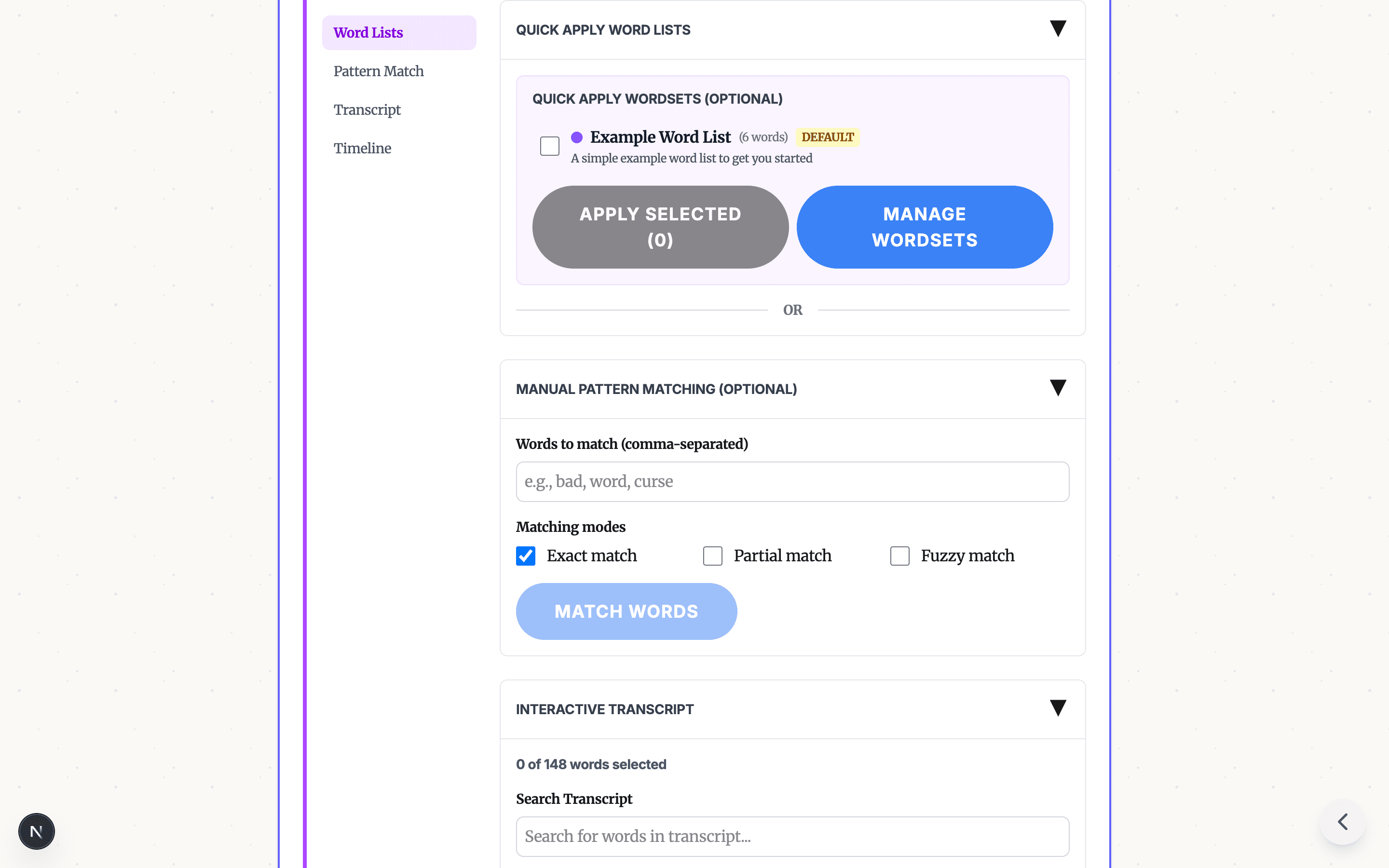
Word Lists
Apply built-in or custom word lists, then review the selected words before export.

Pattern Match
Search for words manually with exact, partial, or fuzzy matching. This helps when you know the specific phrase, name, or variation you need to censor.

Transcript View
Click directly on words in the transcript to toggle them for censoring. Matched words appear highlighted so you can review the full set before processing.

Timeline
Use the timeline for sounds, pauses, or sections that are not captured as a single transcript word.

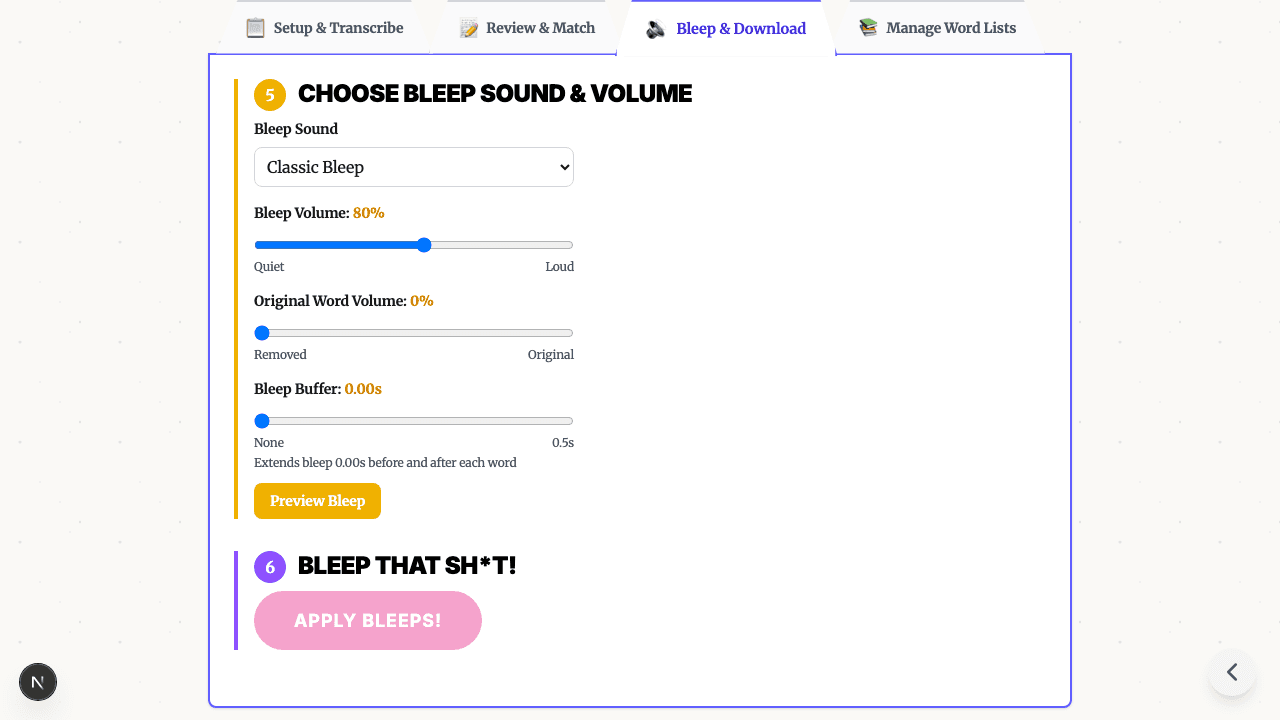
Step 4: Choose Your Bleep Sound
Pick a built-in censor option:
- Classic Bleep: The traditional TV censor tone
- Brown Noise: A softer alternative
- Dolphin Sounds: A comedic option
- T-Rex Roar: A deliberately obvious sound effect
- Silence: Remove the word without adding a tone
Adjust volume and buffer timing, preview the result, then download your censored video.

Tips for Best Results
- Use a clear audio source: Cleaner speech improves transcript quality.
- Start with a fast model: Use a smaller model for quick drafts, then switch models if the transcript needs more care.
- Review selected words: Word lists and matching modes speed up selection, but human review is still the safety step.
- Adjust the buffer: Add a small amount before and after selected words for cleaner timing.
Privacy First
Browser mode is designed for short desktop files and processes on your device. Studio is available for phone uploads and longer files, and the app clearly indicates when cloud processing is part of the workflow. Learn more in the free browser-based video censor tool guide.
Frequently Asked Questions
How do I bleep out curse words in a video? Upload the video, generate an AI transcript with word-level timestamps, review likely matches, select the words to censor, choose a bleep or silence option, preview the timing, and export a clean MP4.
Can I bleep words in a video for free? Yes. Browser mode is free for short files and works best on capable desktop browsers. For phone uploads or longer files, Studio cloud processing is available.
Can I bleep words without CapCut, iMovie, or Premiere? Yes. Bleep That Sh*t! uses transcript review so you can select words from timestamps instead of cutting every word by hand in a timeline editor.
Does bleeping a video change the visuals? No. This workflow censors spoken words in the audio track. It does not blur faces, pixelate video, or remove on-screen text.
What is the fastest way to bleep many words? Start with the transcript and built-in word lists, then manually review each selected word before export. That is faster than cutting each word by hand in a timeline editor.
Get Started
Ready to bleep your first video? Start in Bleep Studio, try the upload-focused censor video online workflow, or read the full video censor tool overview.
Need to process longer files? Bleep Studio offers cloud-powered transcription for audio and video files up to 2 hours. See plans.
READY TO CLEAN YOUR VIDEO IN STUDIO?
Start in Studio for cloud transcription, saved projects, reusable word lists, and cleaner repeat exports.
START IN STUDIO FREERelated Articles
Profanity Filter List for Audio, Video, and Text
A practical profanity filter list strategy for creators: what to detect, what to review manually, and how AI tools help bleep audio or video without over-censoring.
Bleep Sound Effect: How to Add a Censor Beep to Audio or Video
Choose a bleep sound effect, silence, or noise for censoring profanity in audio and video, then place it with transcript timestamps before export.

How to Bleep Out Words in Any Video (Free, No Download)
Bleep out swear words in any video for free. No download or signup required. Upload, select words to censor, and export in seconds.